Last updated: 17 October 2026
Website speed affects how people experience your website. When a page takes too long to display its main content or respond to a click, visitors may lose patience and leave before finding the information they need.
For businesses, a slow website can create unnecessary friction in the customer journey. Visitors may struggle to explore services, submit contact forms, or complete purchases. Website speed optimization helps reduce these problems by improving the way pages load, respond, and display content across different devices.
In this guide, we explain how to evaluate website performance, identify common causes of slow loading, and apply practical improvements using reliable testing methods.
What Is Website Speed Optimization?
Website speed optimization is the process of improving a website’s loading performance, responsiveness, and visual stability. It involves reviewing the resources and systems involved in displaying a page and reducing unnecessary delays.
Several factors can influence website performance, including:
- Server response time and hosting configuration.
- Image dimensions and file sizes.
- JavaScript and CSS processing.
- Browser caching and resource delivery.
- Third-party scripts and embedded content.
- Database queries and server-side processing.
- Mobile device capabilities and network conditions.
The most effective approach is to identify which factors are slowing down your specific website and prioritize changes based on measurable results.
What Is a Good Website Loading Time?
There is no single loading-time number that guarantees good search rankings. A more useful approach is to evaluate how quickly the main content appears, how responsive the page feels, and whether its layout remains stable while loading.
Google uses three Core Web Vitals to assess important aspects of user experience.
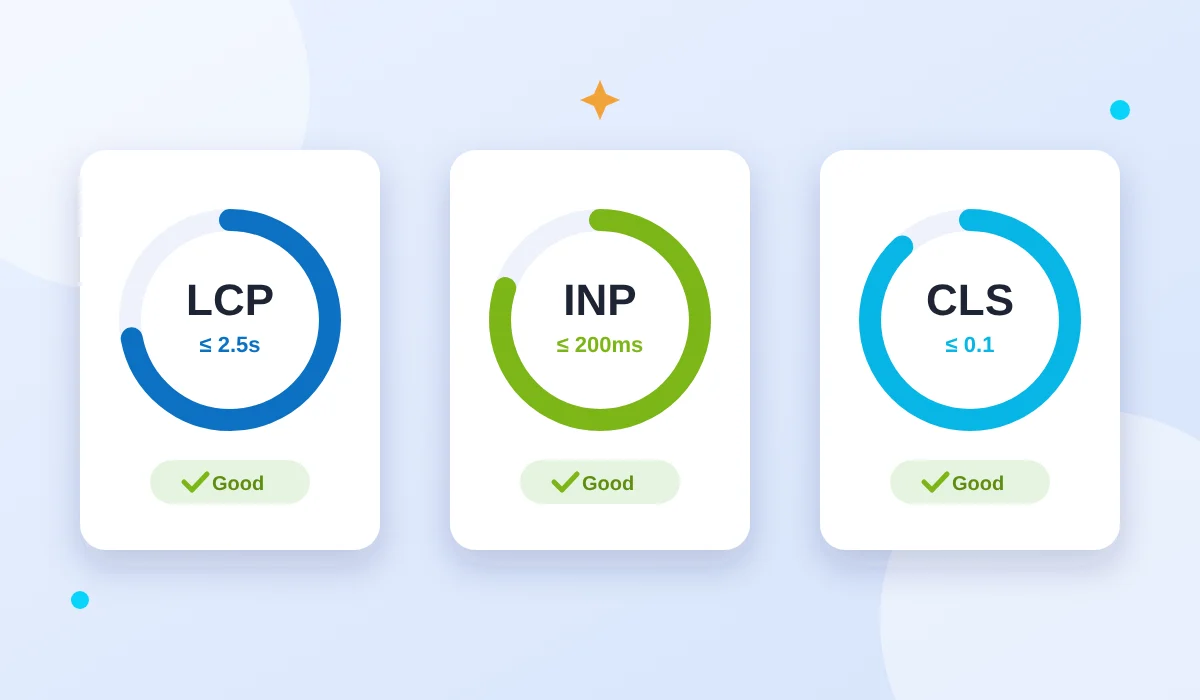
| Metric | Recommended good threshold | What it measures |
|---|---|---|
| Largest Contentful Paint (LCP) | 2.5 seconds or less | How quickly the main content appears |
| Interaction to Next Paint (INP) | 200 milliseconds or less | How responsive the page is to interactions |
| Cumulative Layout Shift (CLS) | 0.1 or less | How stable the visible layout remains |
These thresholds are evaluated at the 75th percentile of real-user visits. Mobile and desktop experiences should be considered separately.
Meeting these targets is a useful performance goal, but it does not guarantee higher rankings or inclusion in Google’s index.
How to Measure Website Speed
Before making changes, test your website to understand its current performance. This helps you focus on actual bottlenecks instead of applying optimizations without knowing whether they will help.
1. Test Your Website With Google PageSpeed Insights
Google PageSpeed Insights provides performance reports for individual URLs.
Visit https://pagespeed.web.dev/ and enter the page you want to test. Run the report for both mobile and desktop.
Review the following information:
- Core Web Vitals assessment, when sufficient field data is available.
- Largest Contentful Paint and other loading metrics.
- JavaScript and CSS issues that may delay rendering.
- Image optimization opportunities.
- Diagnostics related to browser processing and resource delivery.
Do not treat every recommendation as equally important. Start with the issues most likely to affect the page’s real-world performance.
2. Understand Field Data and Lab Data
Performance reports may contain field data, lab data, or both.
Field data represents real-user experiences collected over time. It can reveal problems that occur across different devices, network connections, and browsing conditions.
Lab data comes from controlled testing. It is useful for diagnosing potential bottlenecks and comparing changes, but it does not represent every visitor’s experience.
If field data is unavailable for an individual URL, that does not automatically mean the page is slow or has an indexing problem. Use the available lab diagnostics and other evidence to guide your investigation.
3. Compare Results After Optimization
Record your initial results before changing the website. After implementing a significant improvement, repeat the test under similar conditions.
For example, if you reduce the size of a large banner image, compare the relevant loading metrics before and after the change. If the results do not improve, investigate whether another resource is responsible for the delay.
This measurement-based process helps you distinguish meaningful improvements from changes that make little practical difference.
Common Causes of Slow Website Loading
Large Images and Unoptimized Media
High-resolution images can consume substantial bandwidth, particularly on mobile connections. An oversized hero image may delay the appearance of the main content.
Resize images to appropriate display dimensions and compress them while preserving acceptable visual quality. Consider WebP or AVIF where suitable, and serve responsive image sizes for different screens.
Lazy loading can help with images further down the page. However, avoid lazy-loading an important image that needs to appear immediately in the initial viewport.
Excessive JavaScript
JavaScript powers many interactive website features, but too much processing can delay rendering and user interactions.
Review scripts from themes, plugins, analytics tools, chat widgets, and other integrations. Remove unnecessary code, defer noncritical scripts where appropriate, and break up long-running tasks.
After making changes, test navigation, forms, buttons, and other essential functionality to ensure the website still works correctly.
Render-Blocking CSS and Resources
Browsers need to process certain resources before they can display a page. Large stylesheets or unnecessary dependencies can delay the first meaningful rendering of content.
Remove unused CSS where practical, minimize unnecessary dependencies, and prioritize styles required for the initial viewport. Test any critical CSS changes carefully because incorrect implementation can affect the appearance of the page.
Slow Server Response
A slow server can delay the start of the entire loading process.
Investigate hosting resources, server configuration, database queries, application processing, and caching. If a content management system uses many plugins or extensions, determine whether any are creating unnecessary server work.
A content delivery network (CDN) may improve resource delivery for geographically distributed visitors, but it will not automatically solve every server-side performance problem.
Poor Caching Configuration
Caching allows eligible resources to be reused rather than repeatedly generated or downloaded.
Configure appropriate caching for static resources such as images, stylesheets, scripts, and fonts. Use suitable cache lifetimes and versioned assets so visitors can receive updated files when necessary.
For dynamic pages, ensure that caching rules do not expose private information or interfere with personalized content.
Third-Party Integrations
External services such as advertising platforms, embedded videos, tracking tools, and live-chat widgets can increase download size and browser processing time.
Review whether each integration provides enough value to justify its performance cost. Remove outdated tools and delay nonessential resources where appropriate.
Measure the results after changing third-party loading behavior, and preserve the functionality your business needs.
How to Improve Google’s Core Web Vitals
Improve Largest Contentful Paint
Largest Contentful Paint measures when the largest relevant image or text block in the visible area has been rendered.
To improve LCP:
- Reduce unnecessary server response delays.
- Optimize the main image and serve an appropriate size.
- Avoid lazy-loading the image responsible for initial LCP.
- Reduce resources that delay the initial rendering.
- Preload critical resources only when testing shows a benefit.
Identify the actual LCP element before deciding which optimization to implement.
Improve Interaction to Next Paint
Interaction to Next Paint measures responsiveness across user interactions during a visit.
To improve INP:
- Identify long-running JavaScript tasks.
- Reduce unnecessary third-party scripts.
- Simplify event handlers that perform excessive work.
- Break complex tasks into smaller pieces when appropriate.
- Test menus, forms, and buttons on real mobile devices.
First Input Delay (FID) was replaced by INP as a Core Web Vital in March 2024. INP is the appropriate metric for current Core Web Vitals evaluation.
Reduce Cumulative Layout Shift
Cumulative Layout Shift measures unexpected visual movement.
To improve CLS:
- Specify image dimensions or reserve suitable space for images.
- Allocate space for advertisements and embedded content.
- Avoid inserting new elements above existing content unexpectedly.
- Review font-loading behavior.
- Check whether pop-ups or dynamically loaded sections move the page.
A stable layout makes it easier for visitors to read content and interact with page elements without losing their place.
Website Speed Optimization for WordPress
WordPress websites can become slower when themes, plugins, images, and scripts introduce unnecessary work. Optimization should begin with measurement rather than installing multiple performance plugins at once.
Start with these steps:
- Review installed plugins and remove those that are no longer needed.
- Update WordPress, themes, and plugins after taking suitable backups.
- Optimize large media files.
- Configure page caching where appropriate.
- Review database and server performance if response times remain high.
- Check whether page builders or third-party scripts add unnecessary resources.
- Test the website after every significant configuration change.
Avoid enabling several overlapping optimization features without understanding how they interact. For example, combining multiple caching or JavaScript optimization systems can cause layout or functionality problems.
The best configuration depends on the website’s hosting environment, theme, plugins, and actual performance bottlenecks.
Does Website Speed Affect SEO?
Website speed and page experience can contribute to search performance, but speed is not the only factor Google considers.
A fast website may still struggle to rank if its content does not satisfy search intent, its pages are difficult to discover, or its technical SEO configuration is incorrect.
Similarly, a page can have good performance metrics but remain unindexed because of a noindex directive, canonicalization problems, crawl accessibility, duplication, or other indexing factors.
A balanced SEO strategy should therefore include:
- Useful and original content.
- Clear site navigation and internal links.
- Correct canonical and indexing directives.
- Accessible pages and a valid XML sitemap.
- Appropriate mobile usability.
- Ongoing technical and performance monitoring.
Improving speed should support the overall experience rather than replace these other SEO requirements.
Website Speed Optimization Checklist
Use this checklist when evaluating a slow website:
- Test important URLs using Google PageSpeed Insights.
- Review mobile and desktop results.
- Check LCP, INP, and CLS where data is available.
- Identify large images and optimize their delivery.
- Review unnecessary JavaScript and CSS.
- Investigate server response times.
- Configure suitable caching.
- Review third-party integrations.
- Test website functionality after changes.
- Compare performance results after optimization.
- Check indexing and canonical signals separately in Google Search Console.
Prioritize the items that address verified problems on your website rather than trying to complete every optimization indiscriminately.
Conclusion
Website speed optimization starts with understanding how a page behaves and identifying the resources responsible for unnecessary delays. By measuring performance, improving image delivery, reducing unnecessary scripts, reviewing caching, and testing each change, website owners can make informed improvements.
For businesses, a faster and more responsive website can create a smoother experience for visitors exploring services or contacting the company. Combine performance improvements with useful content, clear navigation, and sound technical SEO to build a website that better serves both visitors and search engines.
Antigua Web Solutions can help businesses review their websites, identify technical improvement opportunities, and develop a practical plan for improving performance and usability.
Frequently Asked Questions
What is the best way to test website loading speed?
Google PageSpeed Insights is a useful starting point. It provides laboratory diagnostics and, when available, real-user performance data. Test important pages on mobile and desktop to understand where improvements may be needed.
Does a high PageSpeed score guarantee better rankings?
No. A PageSpeed performance score is not a guarantee of ranking improvement. Google considers multiple signals, including content relevance and other aspects of the user experience.
Can image optimization make a website faster?
Yes, reducing unnecessary image bytes can improve resource delivery and may help the main content appear sooner. The actual benefit depends on whether image loading is a significant bottleneck on the page.
Why is my website still slow after installing a caching plugin?
Caching addresses only some performance problems. Large images, excessive JavaScript, slow server processing, and third-party scripts can continue to affect loading and responsiveness.
Can website speed problems prevent Google from indexing a page?
A performance issue alone does not necessarily prevent indexing. However, a page that cannot be accessed successfully or that has other technical restrictions may not be indexed. Use URL Inspection in Google Search Console to investigate the specific status.
How often should I test website performance?
Test after major design changes, plugin updates, new integrations, hosting changes, and optimization work. Periodic checks can help you identify performance regressions before they affect too many visitors.